One include_once() Away From Trouble: How I Found CVE-2024-13545
How a regex search led me to my first CVE, an unauthenticated Local File Inclusion vulnerability in a WordPress theme.
Contents
Introduction
Some vulnerability research starts with a specific target, a complicated testing environment, or a carefully planned methodology.
Mine started with a regex.
I was exploring WordPress plugins and themes, looking for potentially dangerous PHP functions that handled user-controlled input. The idea was pretty simple: search through a lot of source code, find something suspicious, and figure out whether it was actually exploitable.
Nothing particularly revolutionary.
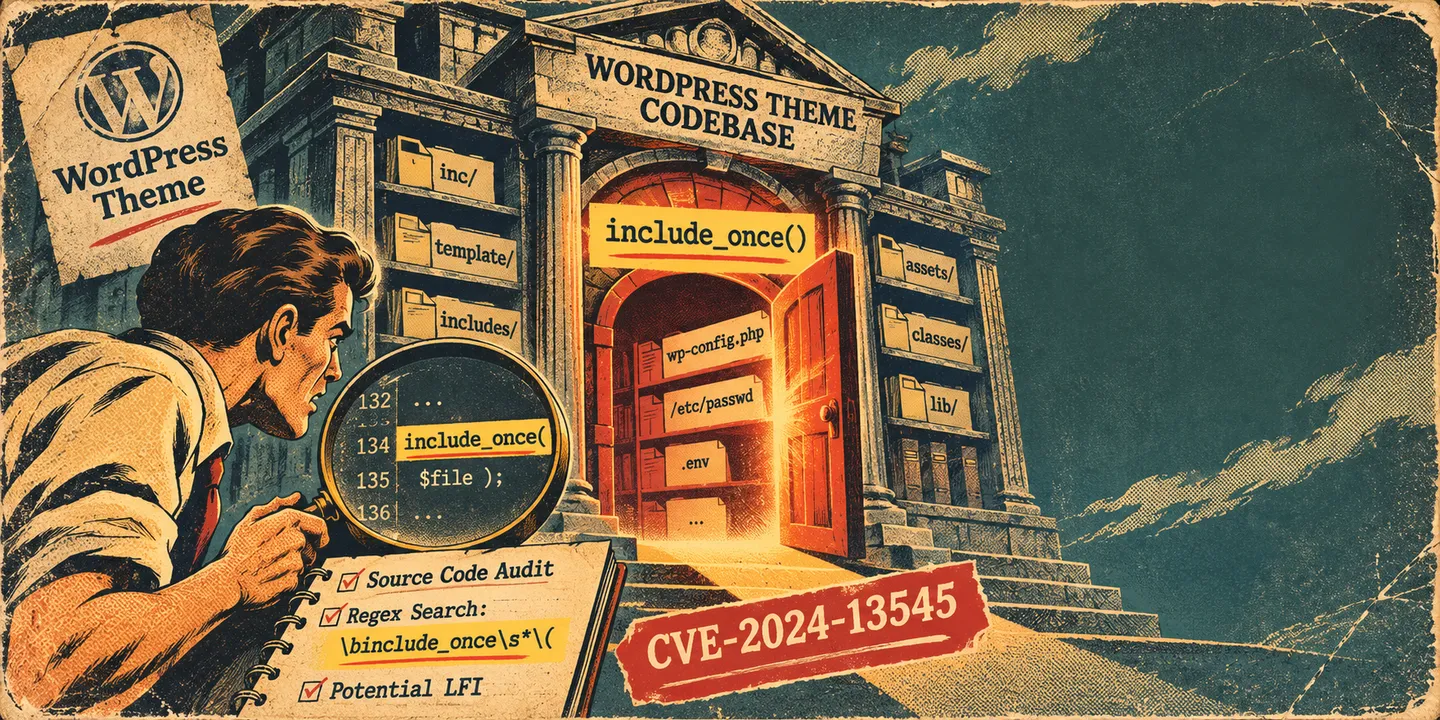
But that approach eventually led me to my first CVE, CVE-2024-13545, an unauthenticated Local File Inclusion (LFI) vulnerability affecting the Bootstrap Ultimate WordPress theme.
The vulnerable code was surprisingly small. Just a few lines of PHP, a user-controlled parameter, and an include_once() call that probably deserved a little more attention.
Let’s take a look at how I found it and why those few lines mattered.
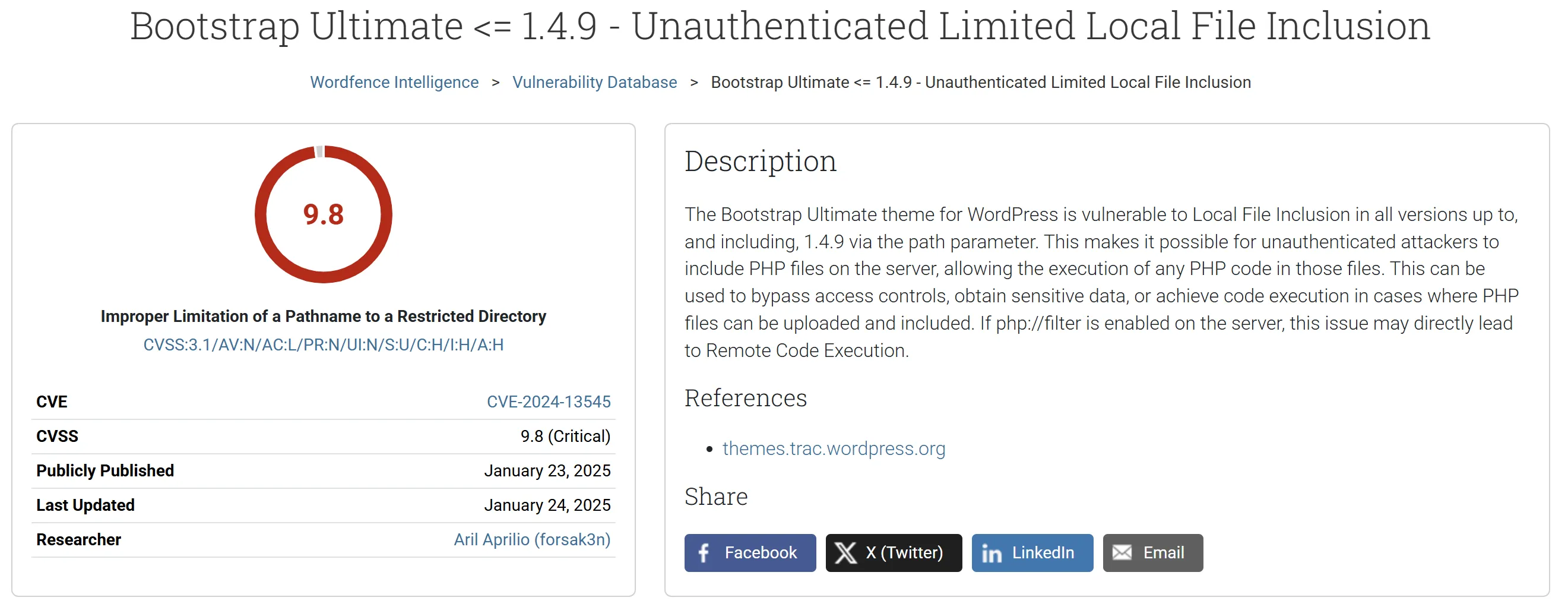
Figure 1. My first published CVE, credited by Wordfence under the handle forsak3n.
1. Hunting for suspicious PHP code

At the time, I remember using a website called WPDirectory to search through the source code of WordPress plugins and themes.
The service is now available as Veloria, a code search engine that supports regular expressions across the WordPress ecosystem.
Rather than downloading hundreds of plugins and manually inspecting their files, I could search for patterns that looked interesting.

And by interesting, I mean PHP code that made me slightly uncomfortable.
Looking for dangerous includes
One of the patterns I was interested in involved PHP’s file inclusion functions:
includeinclude_oncerequirerequire_once
These functions are perfectly legitimate. They’re used everywhere in PHP applications to load files and organize reusable code.
The interesting part is what happens when the filename is influenced by untrusted input.
PHP also provides several superglobal arrays that commonly contain user-controlled data, including $_GET, $_POST, and $_REQUEST.
Combining the two seemed like a reasonable starting point.
I don’t have the exact regex from my original search anymore, but the following is a reconstruction of the kind of pattern I remember using:
\b(?:include|require)(?:_once)?\s*\(?\s*\$_(?:GET|POST|REQUEST)\s*\[Let’s break that down.
| Pattern | Purpose |
|---|---|
\b |
Matches a word boundary |
(?:include|require) |
Looks for include or require |
(?:_once)? |
Also matches their _once variants |
\s* |
Allows optional whitespace |
\(? |
Allows an optional opening parenthesis |
\$_ |
Matches the beginning of a PHP superglobal |
(?:GET|POST|REQUEST) |
Matches common HTTP input sources |
\s*\[ |
Matches the opening array bracket |
This pattern is deliberately simple. It focuses on direct usage of request variables inside inclusion statements.
For example, it would match code such as:
include($_GET['file']);

require_once($_POST['template']);

include_once($_REQUEST['page'] . '.php');
Of course, this isn’t a perfect way to find vulnerabilities.
It can miss cases where user input is first stored in another variable, transformed through several functions, or passed through more complicated logic.
It can also produce false positives when proper validation exists.
But that’s fine. The goal wasn’t to automatically prove that something was vulnerable.

The goal was to find code worth investigating.
2. Finding Bootstrap Ultimate
While going through the search results, I came across a WordPress theme called Bootstrap Ultimate.
One particular file caught my attention:
wp-content/themes/bootstrap-ultimate/docs/index.php
The file was located inside the theme’s docs directory, which appeared to contain documentation-related PHP files.
At first, that doesn’t sound particularly exciting.
A documentation page inside a WordPress theme? Surely nothing could go wrong there.

Opening the file revealed this section of code:
if(isset($_GET["page"]) ) {
    include_once($_GET["page"].'.php');
}
else {
    include_once('thanks.php');
}
*Source: Bootstrap Ultimate 1.4.9, docs/index.php.
That’s it.
The application takes a value from $_GET["page"], appends .php, and passes the result directly into include_once().
No allowlist is visible here. No validation that the requested file belongs to the intended documentation directory.
And most importantly, the filename comes directly from the HTTP request.
At this point, I had a suspicious code pattern.

But suspicious code and a confirmed vulnerability are two different things.
The next step was understanding exactly what the application allowed.
3. Following the user input
Let’s look at the code more closely.
The relevant operation is:
include_once($_GET["page"].'.php');There are three important details here.
3.1. The filename is user-controlled
The application reads the page parameter directly from the query string.
Consider a request like this:
GET /wp-content/themes/bootstrap-ultimate/docs/index.php?page=thanks HTTP/1.1
Host: localhost
The PHP expression constructs the following filename:
thanks.phpThat matches the file used by the default branch when the parameter is absent.
So far, everything looks reasonable.
The problem is that nothing in this statement requires the supplied value to be a legitimate documentation page.
3.2. PHP interprets the resulting path
Now consider a different input:
?page=../exampleThe expression constructs:
../example.phpThe ../ sequence refers to the parent directory when interpreted as part of a filesystem path.
If PHP resolves the include relative to the documentation directory, the requested file can be outside the directory the developer likely intended to use.
The actual path resolution depends on the execution environment and PHP’s include behavior.
This is the critical issue.

The application is not selecting from a fixed collection of documentation pages. It is allowing the request to influence a filesystem path that PHP subsequently attempts to include.
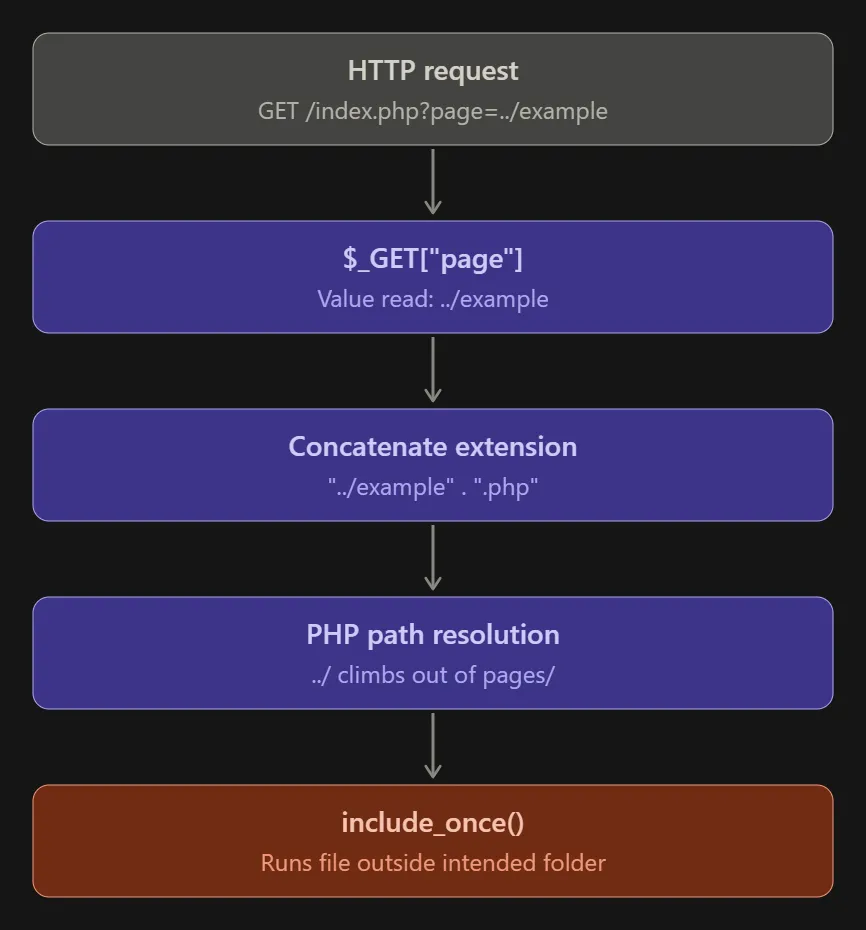
Figure 2. How the page parameter influences the file included by PHP.
3.3. The .php suffix limits the attack
There’s another detail worth discussing.
The application always appends .php to the supplied parameter.
This means the vulnerability is not equivalent to unrestricted arbitrary file reading.
For example, a basic traversal attempt targeting /etc/passwd would not directly select that file because the resulting path would end in .php.
However, this restriction does not make the code safe.
An attacker may still be able to include accessible PHP files outside the intended directory.
And unlike functions that simply read and return file contents, include_once() evaluates the included file as PHP code.
That distinction matters.
The vulnerability is about controlling which PHP file gets included, not automatically obtaining the raw contents of every file on the server.

A small but important detail.
4. Why authentication doesn’t save us here
One of the interesting things about this file is how it initializes WordPress.
At the beginning of docs/index.php, the application contains:
<?php require_once('../../../../wp-load.php');
show_admin_bar(false);
get_header();?>
The relative wp-load.php path is used to bootstrap WordPress from the documentation script.
That allows the file to use WordPress functions such as get_header().
But loading WordPress is not the same as requiring a user to authenticate.
There is no visible authentication or capability check protecting the vulnerable inclusion statement.
Under a configuration where the documentation script is directly accessible over HTTP, an unauthenticated visitor can reach the code without needing a WordPress account.
This is why the issue was classified as an unauthenticated Local File Inclusion vulnerability.
The official advisory identifies Bootstrap Ultimate versions up to and including 1.4.9 as affected.
One interesting discrepancy is worth mentioning. The Wordfence description refers to a path parameter, while the published source code uses page.
For this analysis, I’m using page because that is the actual parameter visible in the vulnerable file.
5. Reproducing the vulnerable behavior
The following is an illustrative local reproduction based on the published source code.
It is not a preserved transcript of my original proof of concept submitted to Wordfence.
To test the path handling safely, we can use a disposable WordPress installation with Bootstrap Ultimate 1.4.9 and a harmless PHP file that prints a recognizable marker.
Preparing a test file
Suppose we create a file named lfi-proof.php in the theme’s root directory.
Its contents are deliberately simple:
<?php
echo "LFI_PROBE_OK";
The resulting structure looks like this:
wp-content/
└── themes/
    └── bootstrap-ultimate/
        ├── lfi-proof.php
        └── docs/
            └── index.php
Notice that lfi-proof.php is outside the docs directory.
This gives us a harmless way to test whether the include operation can reach the parent directory.
Constructing the request
We can then send the following request to our local installation:
GET /wp-content/themes/bootstrap-ultimate/docs/index.php?page=../lfi-proof HTTP/1.1
Host: localhost
Let’s follow the input.
Input:
../lfi-proof

Appended suffix:
../lfi-proof.php

Intended resolved location:
wp-content/themes/bootstrap-ultimate/lfi-proof.php
If PHP resolves the path relative to docs and the file is included successfully, the response should contain:
LFI_PROBE_OKSeeing this marker would demonstrate that the request influenced PHP into including a file outside the intended directory.
The test deliberately uses a file created inside the local lab. It does not require accessing sensitive files or executing a malicious payload.
And there we have the central issue.
A parameter intended to select a documentation page can potentially select a PHP file somewhere else.
Not exactly the kind of flexibility you want from a documentation viewer.
6. Understanding the actual impact
At this point, it’s important not to oversimplify what LFI can do.
The impact depends heavily on which files exist on the server, which paths are accessible, and whether an attacker can influence the contents of an includable file.
There are several relevant scenarios.
Including existing PHP files
An attacker may be able to select an existing PHP file outside the intended directory.
The result depends on that file’s contents and the context in which it is executed.
Some files may produce output, some may trigger unexpected behavior, and others may fail because they expect a different execution environment.
Not every successful inclusion leads to a useful exploit.
Reaching code execution
If an attacker can place attacker-controlled PHP code in a location that can later be included, an LFI vulnerability may become part of a Remote Code Execution chain.
That requires an additional capability or suitable environmental conditions.
The LFI itself does not automatically provide a file upload or file-writing primitive.

Wordfence also mentions potential code execution scenarios involving PHP stream wrappers, including php://filter.
However, demonstrating such a chain would require separate testing of the applicable wrapper behavior, the forced .php suffix, and the PHP environment.
Why Wordfence rated it Critical
The vulnerability was published as:
| Property | Value |
|---|---|
| CVE | CVE-2024-13545 |
| Vulnerable software | Bootstrap Ultimate |
| Affected versions | 1.4.9 and earlier |
| Vulnerability type | Limited Local File Inclusion |
| Authentication | Not required |
| CWE | CWE-22 |
| CVSS v3.1 | 9.8, Critical |
| Researcher | Aril Aprilio (forsak3n) |
The CVSS score reflects the potential impact and conditions described in the advisory.
It should not be interpreted as proof that every affected installation can be exploited to achieve the same outcome.
7. Reporting the vulnerability to Wordfence
After identifying the issue, I reported the vulnerability through Wordfence.
For me, the interesting part wasn’t only finding a dangerous function call.
It was recognizing how a seemingly small implementation detail could become a security issue when exposed through a web-accessible PHP script.
Wordfence subsequently published the vulnerability under CVE-2024-13545 on its vulnerability intelligence platform.
The Wordfence advisory lists January 23, 2025 as its public publication date, while the CVE record was published on January 24, 2025.
And seeing my name credited as the researcher was a pretty memorable moment.

For something that started with a regex search, this was a rather satisfying outcome.
8. How should this be fixed?
The fundamental problem is that user-controlled input determines which file PHP includes.
The safest approach is to avoid using arbitrary request values as filesystem paths.
If the intended feature only allows visitors to select specific documentation pages, an explicit allowlist is a much better solution.
For example, a simplified replacement could look like this:
$allowed_pages = [
    'thanks' => __DIR__ . '/thanks.php'
];

$page = $_GET['page'] ?? 'thanks';

if (!isset($allowed_pages[$page])) {
    http_response_code(404);
    exit;
}

include_once($allowed_pages[$page]);
This example allows only predefined page identifiers.
The visitor can select thanks, but cannot directly supply a relative path that PHP will interpret as a filename.
It also uses __DIR__ to construct an explicit path to the intended file.
This is an illustrative remediation pattern, not an official patch for Bootstrap Ultimate.
Additional protection may include restricting direct access to internal PHP scripts and keeping documentation functionality behind appropriate application routes.
As of the referenced Wordfence advisory, no known patch is listed for the affected theme. Administrators should therefore consider replacing or removing affected installations rather than assuming that the issue has been fixed.
9. Final thoughts
Looking back, what makes this vulnerability interesting isn’t the complexity of the exploit.
Quite the opposite.
It came down to a straightforward PHP inclusion statement and the assumption that a parameter used for selecting documentation pages would only contain legitimate filenames.
The broader lesson is that source code searching can be a useful starting point for vulnerability research.

A regex won’t tell you whether something is exploitable. It won’t understand the application’s complete security model, and it definitely won’t replace manual analysis.
But it can point you toward code that deserves a closer look.
And sometimes, that’s enough.
For me, this was also a reminder that you don’t necessarily need an elaborate research environment to start finding interesting security issues.
Sometimes you just need curiosity, a useful search pattern, and the willingness to dig into a piece of code that looks a little too trusting.
All that from one include_once().
PHP never disappoints.